

- Pipecat Evals for executable specifications close to the codebase.
- An evaluation platform for production-like conversations, richer voice analysis, dashboards, monitoring, human review, and longitudinal quality trends.
Lifecycle at a glance
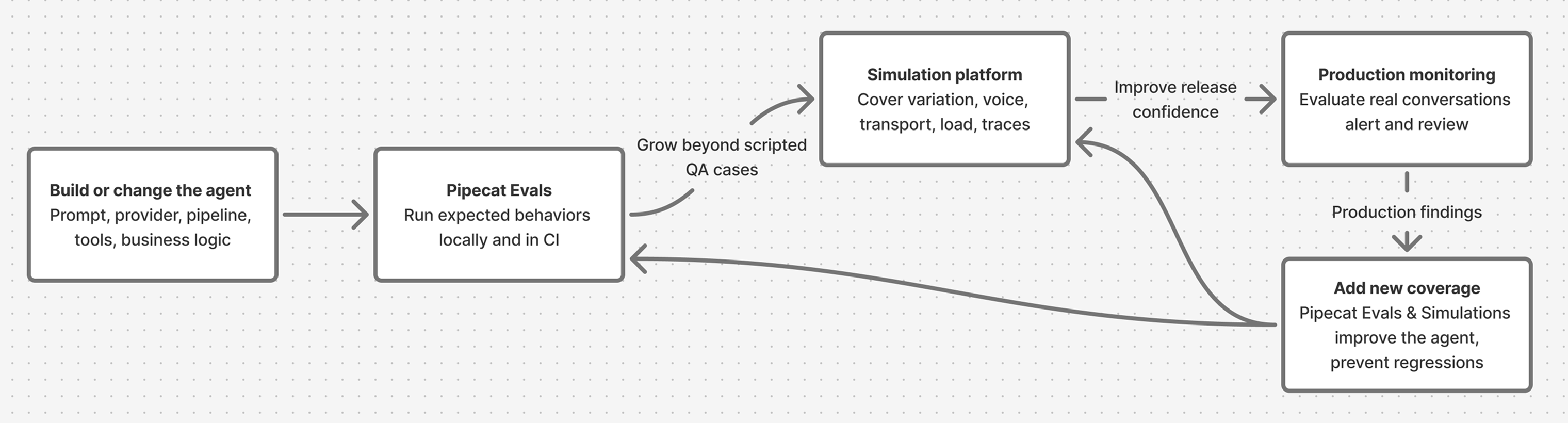
Start local
Use Pipecat Evals as soon as the agent has behavior worth preserving. This usually starts before deployment, while the agent still runs on a laptop or in a pull request. Good local evals look like small executable specs:- “The agent greets on connect.”
- “The agent remembers the user’s name two turns later.”
- “The agent calls
lookup_orderbefore answering an order-status question.” - “The agent recovers when the user interrupts a long answer.”
- “The first response starts within the expected latency budget.”
- “A caller who wants a table for two at 6 PM gets one booked, and every reply stays courteous.”
Put local evals in CI
Once a few scenarios exist, run them on every meaningful change. A small set of behavior-critical scenarios gives engineers and coding assistants a clear pass/fail signal. Use Pipecat Evals in CI when:- The agent is still changing quickly.
- The question is “did this code or prompt change preserve an expected behavior?”
- The expected behavior can be expressed as a scripted conversation or as a caller’s goal.
- The failure should block a pull request.
- The debug artifact should live next to the code as a log or trace file.
When to add a simulation and evaluation platform
Add a platform when the risk you need to test extends beyond a small local scenario. Keep the Pipecat suite in place, then layer on broader coverage, shared workflows, and production feedback.Choose the right layer
Think of local evals as behavioral unit tests for the agent. Think of an evaluation platform as system testing and quality operations for the agent in the world.Use Pipecat Evals for
Local development, pull-request gates, coding-assistant loops, scripted
behavioral specs, simulated callers with a goal, function-call assertions,
latency budgets, per-reply quality metrics, and fast text mode iteration.
Use an evaluation platform for
Caller populations and variation at scale, realistic voice and telephony
paths, load, audio-signal metrics, trace metrics, submitted production
calls, dashboards, human review, scheduled runs, and agent-native CLI, MCP,
or skill-based workflows.
Example: appointment booking
Suppose your Pipecat agent books appointments. Start with a local scenario that protects the core behavior:appointment_booking.yaml
book_appointment.yaml
- Can the agent handle a hundred different callers, impatient ones included, over a real phone line?
- Does the agent still work when the caller is in a noisy room?
- Did the booking API actually succeed, or did the agent only say that it did?
- Are users getting frustrated when the available slots are limited?
- Is the booking-success rate drifting after a model or voice-provider change?
Simulate before launch
Local scripted scenarios are intentionally crisp, and a local simulation plays one caller at a time. Platform simulations broaden the same flow across caller populations, voice conditions, transport paths, load, abuse attempts, and tool behavior. For regressions that need exact replay, use fixed transcripts, scripted turns, or pre-recorded audio. For tool-heavy flows, include traces so evaluation can check what happened under the transcript: tool calls, arguments, span attributes, errors, timing, and custom numerical metrics from OpenTelemetry. For the appointment agent, a transcript might show:“You’re all set for Tuesday at 3 PM.”A simulation can also check that
book_appointment was called with the
requested day, time, and timezone, that the tool returned success, and that later
spans stayed clear of errors, retry failures, and cancellations.
When judgment matters, route selected conversations to human review. Review
queues, labels, assignments, and agreement scores turn ambiguous calls into
better metrics, tighter ground truth, and better future cases.
Monitor production conversations
Once users are live, send completed production conversations to the platform for monitoring. Score the same quality signals over time, route ambiguous calls into review, and track trends by agent version, transport, scenario, and customer segment.Feed findings back into tests
Production monitoring and human review should create the next evaluation inputs: new local scripted scenarios for crisp regressions, new local simulations for the flows that broke, new platform simulation cases for broader user behavior, new trace metrics for hidden tool failures, and new monitoring metrics for recurring production patterns.Practical adoption path
Start small and grow in layers:- Create 5-10 scripted scenarios for the agent’s most important behaviors.
- Run the suite in CI and require it before merging prompt, model, tool, or pipeline changes.
- Add a simulation for each flow with a job to finish, a booking, an
intake, an order, with
runs: 3so the flow has to hold more than once. - Add audio-mode checks before release for the flows most sensitive to STT, TTS, VAD, and turn-taking.
- Add platform simulations when you need caller populations at scale, telephony or WebSocket coverage, load testing, trace checks, and audio-signal metrics.
- Instrument traces for tool-heavy workflows so evaluations can verify what happened under the hood.
- Expose platform controls to your coding assistant through CLI, MCP, or agent-skill surfaces so the same assistant that fixes local evals can launch simulations, inspect failures, and triage monitoring results.
- Send production calls to monitoring once users are live, then turn recurring failures into new simulations, metrics, human-review projects, or local scenarios.
Next steps
Pipecat Evals Quickstart
Write and run the first local scenario against an existing agent.
Third-party Platforms
Review the available platform integrations for simulation and monitoring.
Scripted and Simulated Scenarios
Learn the YAML formats: turns and expectations for a script, a persona and a
goal for a simulation.
Example Platform Setup
See one concrete setup path for simulations, monitoring, traces, and team
review workflows.